Categories and Subcategories in PHP and MySQL: One Query, No N+1
Based on the SQL Help series David J. Lake published here in 2006 to 2009. Rewritten for MySQL 8 by the WeFixTech editorial team. The original page used PHP mysql_* functions, which were removed in PHP 7; the code below uses PDO.

We may earn a commission if you buy through links on this page. It never changes our verdicts. How we review.
A MySQL category subcategory query should retrieve the entire tree in a single round-trip, rather than running a separate query for every category. If you only need one level of subcategories, a self-join does the job:
SELECT p.name AS category, c.name AS subcategory
FROM categories p
LEFT JOIN categories c ON c.parent_id = p.category_id
WHERE p.parent_id IS NULL
ORDER BY p.name, c.name;
Any depth? Use WITH RECURSIVE, available in MySQL 8.0 and later. The example below shows how.
The aim is to display related data, such as artists, their albums and the tracks on each album, in grouped output. Each heading should appear just once. The music library is a familiar teaching example, but the same approach applies to product categories, forum sections and other parent-child structures.
The trap: a query per category
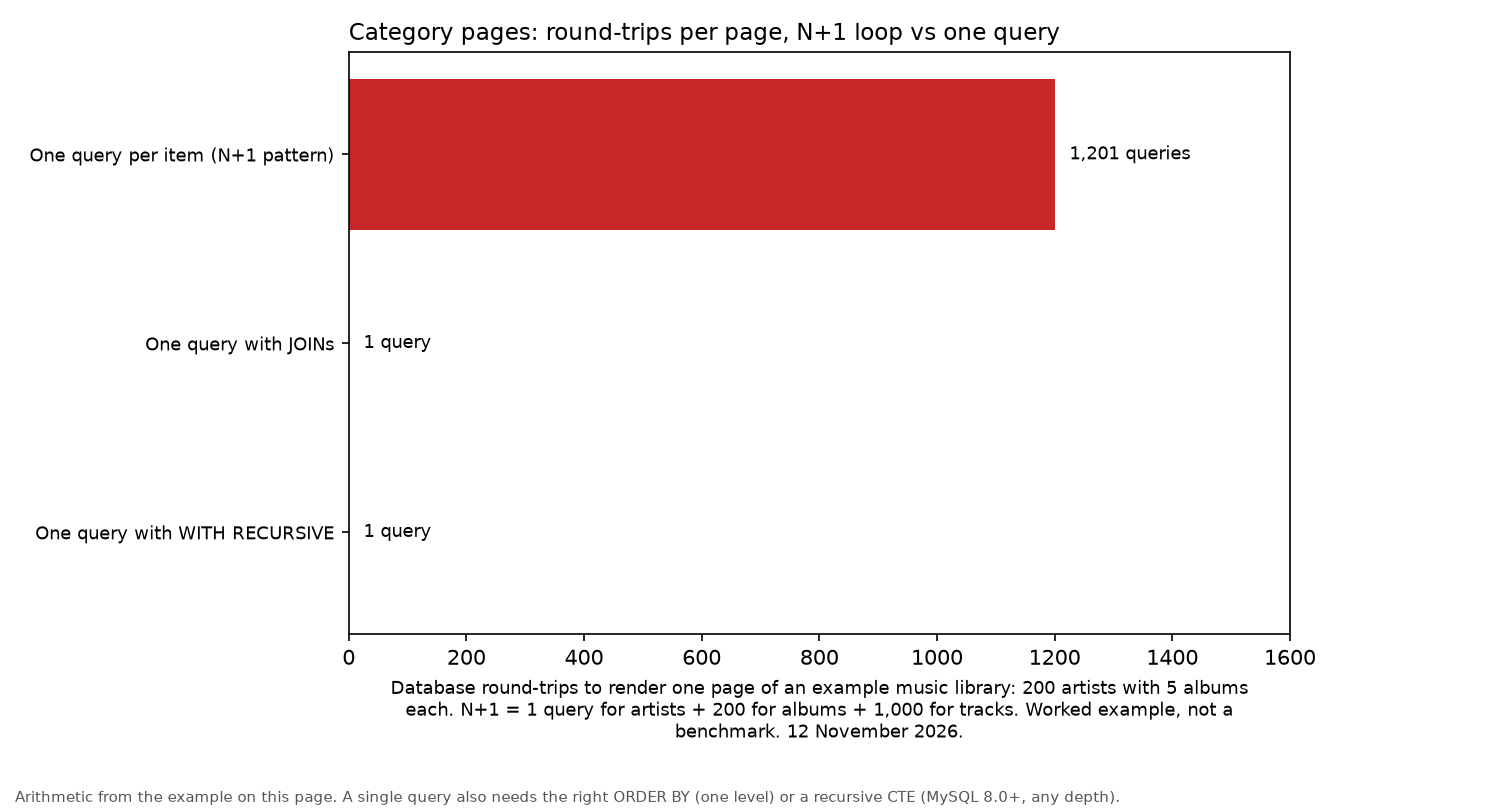
A common first attempt is to query the artists, then run a loop that fetches each artist's albums and each album's tracks separately. This creates the N+1 query problem. For a library containing 200 artists with five albums each, that means 1,201 database round-trips just to render one page. It looks fine in testing, then crawls in production.
There is a better way. The database can return the entire tree, already sorted for display, in one query. The remaining task is to regroup those flat rows into headings as the PHP loop processes them.
The schema and the query
CREATE TABLE artists (
  artist_id   INT AUTO_INCREMENT PRIMARY KEY,
  artist_name VARCHAR(60) NOT NULL
);
CREATE TABLE albums (
  album_id   INT AUTO_INCREMENT PRIMARY KEY,
  artist_id  INT NOT NULL,
  album_name VARCHAR(80) NOT NULL
);
CREATE TABLE tracks (
  track_id   INT AUTO_INCREMENT PRIMARY KEY,
  album_id   INT NOT NULL,
  track_name VARCHAR(100) NOT NULL
);

SELECT a.artist_name, al.album_name, t.track_name
FROM artists a
LEFT JOIN albums al ON al.artist_id = a.artist_id
LEFT JOIN tracks t  ON t.album_id   = al.album_id
ORDER BY a.artist_name, al.album_name, t.track_name;
Two choices matter here. First, the LEFT JOINs keep artists who have no albums in the results. Change them to INNER JOIN if those artists should be excluded. Second, the ORDER BY follows the same hierarchy as the intended display. The PHP loop relies on this ordering to regroup the rows correctly.
The PHP: track what changed
The PHP code walks through the flat result set and keeps track of the current artist and album. It prints a heading only when the relevant name changes:
<?php
$pdo = new PDO('mysql:host=localhost;dbname=music;charset=utf8mb4',
               'user', 'pass',
               [PDO::ATTR_ERRMODE => PDO::ERRMODE_EXCEPTION]);
$rows = $pdo->query("
    SELECT a.artist_name, al.album_name, t.track_name
    FROM artists a
    LEFT JOIN albums al ON al.artist_id = a.artist_id
    LEFT JOIN tracks t  ON t.album_id   = al.album_id
    ORDER BY a.artist_name, al.album_name, t.track_name
");
$currentArtist = null;
$currentAlbum  = null;
foreach ($rows as $row) {
    if ($row['artist_name'] !== $currentArtist) {
        $currentArtist = $row['artist_name'];
        $currentAlbum  = null;                    // new artist resets album tracking
        echo '<h2>' . htmlspecialchars($currentArtist) . '</h2>';
    }
    if ($row['album_name'] !== null && $row['album_name'] !== $currentAlbum) {
        $currentAlbum = $row['album_name'];
        echo '<h3>' . htmlspecialchars($currentAlbum) . '</h3>';
    }
    if ($row['track_name'] !== null) {
        echo '<p>' . htmlspecialchars($row['track_name']) . '</p>';
    }
}
Details that matter:
- Reset the inner tracker when the outer changes. Set
$currentAlbum = nullwhenever a new artist appears. Without it, two artists who both have an album called "Greatest Hits" could merge under one heading. - The NULL checks account for artists without albums and albums without tracks. These records remain in the results because of the LEFT JOINs.
htmlspecialchars()on everything you echo: band names and other text can contain characters such as&and<, which need to be escaped before output.
Prefer building an array first? Same idea, different shape:
$tree = [];
foreach ($rows as $r) {
    $tree[$r['artist_name']][$r['album_name'] ?? ''][] = $r['track_name'];
}
This works when the number of levels is fixed. Category structures in real applications often grow, though. A shop might start with "Music > Rock > Punk" and add a fourth level later. A single categories table with a parent_id column handles that kind of structure:
CREATE TABLE categories (
  category_id INT AUTO_INCREMENT PRIMARY KEY,
  parent_id   INT NULL,
  name        VARCHAR(80) NOT NULL,
  FOREIGN KEY (parent_id) REFERENCES categories (category_id)
);
Top-level categories have parent_id set to NULL. The one-level query at the start of this article works with this table.
Make sure parent_id is indexed. InnoDB automatically creates an index for the foreign key. If you leave out the foreign key, add INDEX (parent_id) yourself. Otherwise, each join has to scan the entire table.
Any depth: WITH RECURSIVE (MySQL 8)
MySQL 8.0 introduced recursive common table expressions, which make it possible to retrieve category trees of any depth. The MySQL 8.0 manual explains the structure: start with a non-recursive query to select the initial rows, add UNION ALL, then use a recursive query that joins back to the CTE.
WITH RECURSIVE tree AS (
  SELECT category_id, parent_id, name,
         0 AS depth,
         CAST(name AS CHAR(1000)) AS path
  FROM categories
  WHERE parent_id IS NULL
  UNION ALL
  SELECT c.category_id, c.parent_id, c.name,
         t.depth + 1,
         CONCAT(t.path, ' > ', c.name)
  FROM categories c
  JOIN tree t ON c.parent_id = t.category_id
)
SELECT category_id, parent_id, name, depth, path
FROM tree
ORDER BY path;
The query returns a few useful values alongside each category:
depthindicates how far down the tree a category sits. PHP can use it to calculate indentation.pathgives the full hierarchy, such as "Music > Rock > Punk". Sorting by this value keeps each child directly below its parent.- The
CASTmatters because, as the manual explains, column types come from the non-recursive part of the CTE only. Without a sufficiently wideCHAR, longer paths can be truncated. - Loops: if incorrect data makes a category its own ancestor, recursion eventually stops at
cte_max_recursion_depth, which is 1,000 by default (per the manual).
To retrieve every subcategory beneath a particular category, at any depth, use the same recursive approach but change the starting point:
WITH RECURSIVE sub AS (
  SELECT category_id, name FROM categories WHERE category_id = ?
  UNION ALL
  SELECT c.category_id, c.name
  FROM categories c JOIN sub s ON c.parent_id = s.category_id
)
SELECT * FROM sub;
These examples use MySQL 8.0 manual syntax. Their logic was also checked against a small sample tree in SQLite 3.46, which supports the same WITH RECURSIVE form. They were not run on a MySQL server, so test them on your own MySQL 8 copy first. MySQL 5.7 does not support recursive CTEs.
Building the tree in PHP
Another option is to fetch every category in one query, group the results by parent_id, then walk through those groups to build the output. This takes one query and one pass through the rows:
<?php
$rows = $pdo->query('SELECT category_id, parent_id, name FROM categories ORDER BY name')
->fetchAll(PDO::FETCH_ASSOC);
$children = [];
foreach ($rows as $r) {
$children[$r['parent_id'] ?? 0][] = $r; // 0 = top level
}
function options(array $children, int $parent = 0, int $depth = 0): string {
$html = '';
foreach ($children[$parent] ?? [] as $c) {
$label = str_repeat(' ', $depth) . htmlspecialchars($c['name']);
$html .= '<option value="' . (int)$c['category_id'] . '">' . $label . '</option>';
$html .= options($children, (int)$c['category_id'], $depth + 1);
}
return $html;
}
echo '<select name="category_id">' . options($children) . '</select>';
Using the recursive CTE instead? Loop through its rows in path order and use depth to indent each category. There is no need to group the results first.
Adjacency list vs nested set vs closure table
| Model | Reads (whole tree or subtree) | Writes (add, move, delete) | When to use |
|---|---|---|---|
Adjacency list (parent_id) |
One recursive CTE in MySQL 8 | Easy: change one row | Most sites; any MySQL 8 project |
Nested set (lft, rgt) |
Fast single query, no recursion | Slow: renumbers many rows | Large, read-heavy trees that rarely change |
| Closure table (ancestor, descendant pairs) | Fast, simple joins | Moderate: extra rows per node | Frequent subtree queries plus regular edits |
For a more detailed explanation of these approaches, Mike Hillyer's Managing Hierarchical Data in MySQL remains a classic reference for adjacency list and nested set models.
Whichever approach you choose, the aim is the same: retrieve the data in one database round-trip, regardless of how large the library becomes. That lesson outlives any language or framework.
FAQ
How do I get all subcategories of a category in MySQL?
On MySQL 8, use a recursive CTE that starts at the category and joins parent_id back to the CTE, as in the "Any depth" section. On 5.7, loop in PHP or move to a nested set.
Does MySQL support recursive queries?
Yes, from MySQL 8.0, through WITH RECURSIVE. Earlier versions do not. Check yours with SELECT VERSION();.
Adjacency list or nested set?
An adjacency list (parent_id) is the better choice for most sites because edits are simple and MySQL 8 handles reads. A nested set makes more sense for large trees that are read much more often than they are changed.
Why not just run one query per category?
It may look simpler, but every extra query adds another round-trip. With 200 artists and five albums each, the loop runs 1,201 queries to draw one page. A JOIN or recursive CTE needs just one query, with the database handling the sorting.
How do I show categories and subcategories in a dropdown in PHP?
Fetch all rows once, group them by parent_id, then build <option> tags recursively, using indentation to show each category's depth. See "Building the tree in PHP".