Convert VARCHAR to DATE in MySQL with STR_TO_DATE
Based on the SQL Help series David J. Lake published here in 2006 to 2009. Rewritten for MySQL 8 by the WeFixTech editorial team.

To convert varchar to date in MySQL, use STR_TO_DATE(varchar_col, format) and make sure the format string matches the way the dates are stored. Do not change the original column in place. Add a new DATE column, fill it, and check the result before you rename anything.
If you are still getting to grips with SQL, the guide to the best SQL books for beginners is a useful place to start.
Why text dates cause problems
Dates end up stored as text when someone wants them displayed as 23/06/2002 rather than 2002-06-23, and storing the display format looks like the obvious shortcut. Storage and display are different jobs. Keep the column as DATE or DATETIME, and format it when you show it:
SELECT DATE_FORMAT(order_date, '%d/%m/%Y');
A VARCHAR column compares characters from the left, not calendar dates. The text 01/12/2020 sorts before 23/06/2002, because 0 comes before 2, even though June 2002 is the earlier day. Range filters, date arithmetic and indexes also work on a real DATE column. They do not work the same way on text that only looks like a date.
STR_TO_DATE: text in, date out
The MySQL 8.4 reference manual describes STR_TO_DATE(str, format) as the inverse of DATE_FORMAT. It reads a string with the format you supply and returns a date value. The mysqltutorial.org guide walks through the same function for data migration. What an invalid string does depends on the server version and SQL mode, so check the manual for the version you are migrating, and try the statement on a copy of the data first.
SELECT STR_TO_DATE('23/06/2002', '%d/%m/%Y');
-- 2002-06-23

SELECT STR_TO_DATE('23/06/2002 14:05:09', '%d/%m/%Y %H:%i:%s');
-- 2002-06-23 14:05:09 (DATETIME, because the format includes a time)

SELECT STR_TO_DATE('06-23-02', '%m-%d-%y');
-- 2002-06-23

SELECT STR_TO_DATE('1/4/02', '%d/%m/%y');
-- 2002-04-01 (a missing leading zero is fine)
The manual's rules for that function, checked on 7 November 2026:
- If the format includes both a date and a time, the result is
DATETIME. A date-only format returnsDATE. A time-only format returnsTIME. - If the string cannot be parsed with the format,
STR_TO_DATEreturnsNULLand a warning. - Scanning starts at the beginning of the string. Extra characters at the end are ignored. A mismatch at the start returns
NULL. - The format uses the same
%specifiers asDATE_FORMAT.
The specifiers you will use most are %d for the day, %m for the month, %Y for a four-digit year, and %y for a two-digit year, plus %H:%i:%s for a time. For %y, the manual's two-digit year rules map 00 to 69 onto 2000 to 2069, and 70 to 99 onto 1970 to 1999. The manual calls those rules a reasonable guess. If a row of 69 means 1969 in your data, the guess is wrong, so check it before you migrate.
Format-specifier cheat table
| Layout | Example input | STR_TO_DATE call | Result | Notes |
|---|---|---|---|---|
| UK DD/MM/YYYY | 23/06/2002 |
STR_TO_DATE(col, '%d/%m/%Y') |
2002-06-23 |
Common UK legacy text |
| UK DD/MM/YY | 23/06/02 |
STR_TO_DATE(col, '%d/%m/%y') |
2002-06-23 |
02 falls in 2000 to 2069. Check the other years. |
| US MM/DD/YYYY | 06/23/2002 |
STR_TO_DATE(col, '%m/%d/%Y') |
2002-06-23 |
Do not mix this with UK data |
| ISO YYYY-MM-DD | 2002-06-23 |
CAST(col AS DATE) or STR_TO_DATE(col, '%Y-%m-%d') |
2002-06-23 |
CAST only for this ISO shape |
| EUR dotted | 23.06.2002 |
STR_TO_DATE(col, GET_FORMAT(DATE, 'EUR')) |
2002-06-23 |
GET_FORMAT(DATE, 'EUR') returns %d.%m.%Y |
| Datetime | 23/06/2002 14:05:09 |
STR_TO_DATE(col, '%d/%m/%Y %H:%i:%s') |
2002-06-23 14:05:09 |
Returns DATETIME, not DATE |
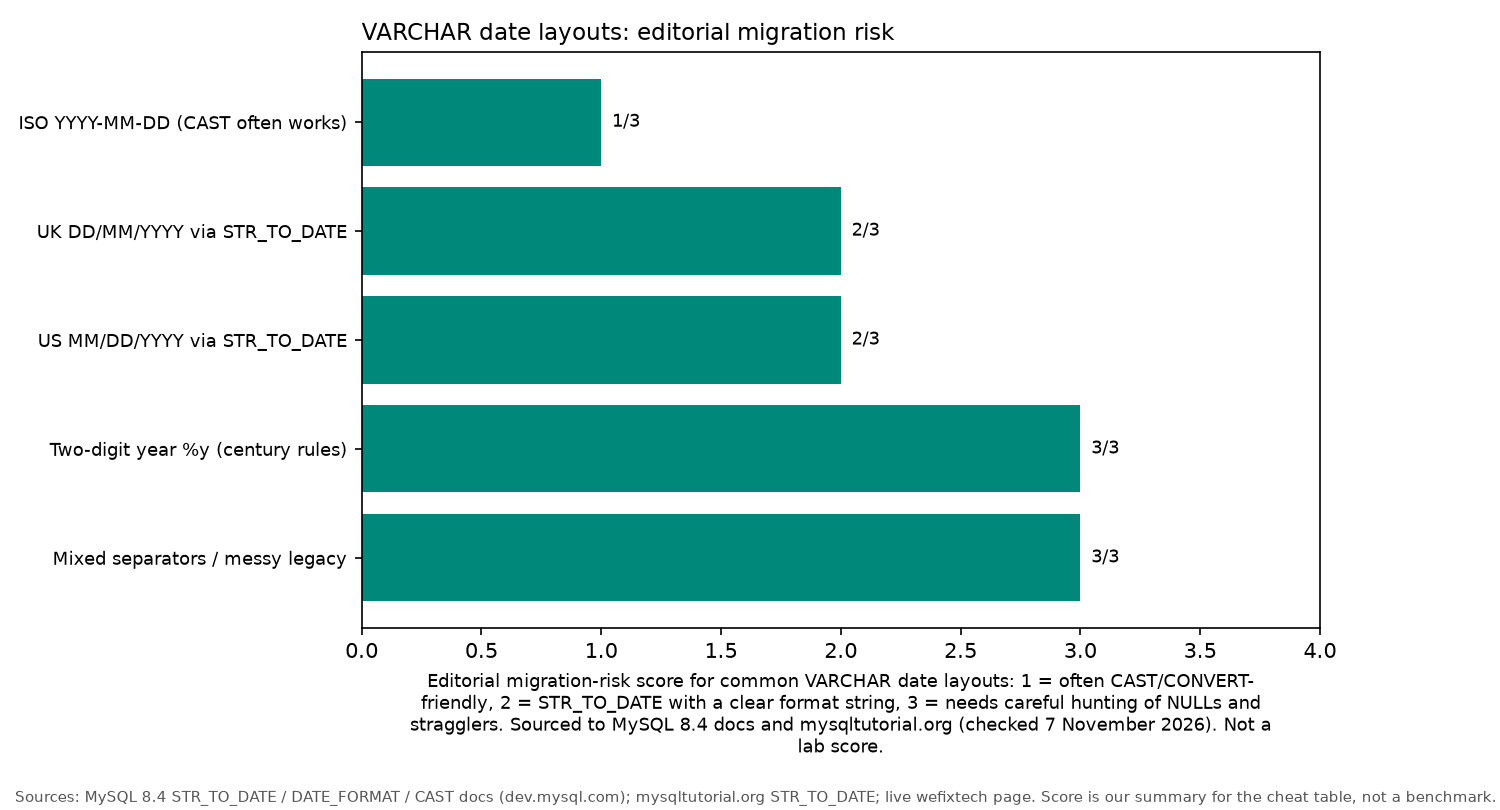
The bars are an editorial summary of how much care each layout needs. They are not a benchmark, and they are not a result from running these conversions on a server.
Safe migration checklist
Changing the original column type in one shot can drop values you still need. Work on a backup or a staging copy, and keep the text until the new column checks out. If the dates are still in a file, you can fix them during import instead: see transforming values with LOAD DATA.
-
Add a column. Create a new
DATEcolumn beside the text.idin the later query is whatever identifies the row in your table.ALTER TABLE orders ADD COLUMN order_date_new DATE;
-
Update. Fill the new column from the text. This example is UK day/month/year. Use the format that matches your rows, not this one by habit.
UPDATE orders
SET order_date_new = STR_TO_DATE(order_date, '%d/%m/%Y');
-
Hunt NULLs. This finds text that was present but did not become a date. It is not a full validation. See the strict-mode note under the list.
SELECT id, order_date
FROM orders
WHERE order_date IS NOT NULL
  AND order_date_new IS NULL;
-
Swap. After you have checked the rows, the queries that use the column, and a restorable backup, rename. This keeps the original text as
order_date_textuntil you are ready to drop it.ALTER TABLE orders RENAME COLUMN order_date TO order_date_text, RENAME COLUMN order_date_new TO order_date;
Strict-mode note: MySQL 8.4's default sql_mode includes STRICT_TRANS_TABLES, NO_ZERO_DATE and NO_ZERO_IN_DATE. Leave it enabled. Do not run SET SESSION sql_mode = '' to force the migration through. On InnoDB, an invalid date in a data-change statement can raise an error and roll that UPDATE back, so the row that stopped it never appears in the NULL query above. The STR_TO_DATE manual page says an unparseable string returns NULL with a warning, and that MySQL 8.4 does complete range checking and raises an error if the converted date would be invalid. The same page still shows an older example in which 31 April comes back as a date, and a note that the day and month are not always checked as a pair. Those statements do not agree, so test the UPDATE on a copy of your server rather than trusting either example. With NO_ZERO_DATE enabled, the manual's STR_TO_DATE example of a zero date returns NULL and a warning. A NULL sweep still misses dates that parsed under the wrong layout: UK text read with a US format is a real date, and it will not be NULL.
CAST and CONVERT, only for ISO dates
The MySQL conversion functions are enough when the string is already ISO YYYY-MM-DD:
SELECT CAST('2002-06-23' AS DATE);
SELECT CONVERT('2002-06-23', DATE);
Neither call parses UK DD/MM/YYYY text. Do not point CAST or CONVERT at 23/06/2002 and expect 23 June 2002. If the layout is anything other than an ISO date string, use STR_TO_DATE with a format that matches it.
Messy data: a SUBSTRING_INDEX fallback
A real legacy column is rarely one tidy format. STR_TO_DATE accepts a missing leading zero, so '1/4/2002' and '01/04/2002' can share '%d/%m/%Y'. When you do have to take a delimited string apart, SUBSTRING_INDEX(str, delim, n) returns everything before the nth copy of the delimiter. A negative n counts from the end. Unlike SUBSTRING, it does not care how many digits each part has:
SELECT SUBSTRING_INDEX('23/06/2002', '/', 1);
-- '23' (day)

SELECT SUBSTRING_INDEX(SUBSTRING_INDEX('23/06/2002', '/', 2), '/', -1);
-- '06' (month)

SELECT SUBSTRING_INDEX('23/06/2002', '/', -1);
-- '2002' (year)
The 2006 version of this page taught that split. It is still a fallback for slash-separated day/month/year values, not the usual method. It is not a general fix for mixed UK and US layouts, missing fields, or dates that are not real calendar days. Use it only where a single format string cannot describe the row, and only when the year is four digits. %Y is a four-digit year. Do not glue 20 onto a two-digit year unless you have checked that every year really is in the 2000s.
SELECT STR_TO_DATE(
  CONCAT(
    SUBSTRING_INDEX(order_date, '/', -1), '-',
    SUBSTRING_INDEX(SUBSTRING_INDEX(order_date, '/', 2), '/', -1), '-',
    SUBSTRING_INDEX(order_date, '/', 1)
  ), '%Y-%m-%d')
FROM orders;
For 23/06/2002 the CONCAT builds 2002-06-23. Look for NULL afterwards as well. That check still will not catch a date that parsed cleanly and is the wrong day.
FAQ
How do I convert a VARCHAR date to DATE in MySQL?
Use STR_TO_DATE(col, format) and choose a format that matches the stored text. UK day/month/year dates use '%d/%m/%Y'. Add a new DATE column and check the result before you rename anything. The same question is discussed, as further reading rather than a quoted answer, on Stack Overflow.
What is STR_TO_DATE vs CAST?
CAST and CONVERT are for strings that are already ISO YYYY-MM-DD. They do not parse UK DD/MM/YYYY text. STR_TO_DATE is the function that takes a format string.
Why does my date sort wrong when stored as text?
A VARCHAR column sorts character by character. The text 01/12/2020 sorts before 23/06/2002, even though June 2002 is earlier. A DATE column sorts by the calendar.
How do I safely change a VARCHAR column to DATE?
Add a new DATE column, fill it with STR_TO_DATE, inspect the result on a staging copy, then rename. Keep the original text until the migration is checked. Do not turn strict mode off to push the UPDATE through. Further reading, not quoted answers: changing a birth-date column from VARCHAR to DATE and switching VARCHAR to DATE on DBA Stack Exchange.
What format string do I use for DD/MM/YYYY?
Use '%d/%m/%Y'. For a two-digit year, use '%d/%m/%y' and check the century. MySQL maps 00 to 69 onto 2000 to 2069, and 70 to 99 onto 1970 to 1999. Those rules are a guess, so check them against your own rows.
What happens to bad rows in strict mode?
MySQL 8.4 strict mode is on by default. An invalid value can abort the UPDATE instead of being stored as NULL, so a later NULL query never sees the row that stopped the statement. A value that parsed with the wrong format is a real date and is not NULL either. Keep strict mode enabled. A NULL sweep is not a complete check.
I need the ID of a row I just inserted. Where do I start?
Start with the guide to LAST_INSERT_ID. It covers AUTO_INCREMENT and why a hand-rolled MAX(id)+1 is a race.
Where can I learn SQL basics properly?
The best SQL books for beginners guide lists MySQL-friendly first books, plus PostgreSQL and SQL Server options.