Best NVMe SSD for Raspberry Pi 5
The best NVMe SSD for Raspberry Pi 5 is the official Raspberry Pi SSD Kit for most people. It combines a Raspberry Pi 2230 drive with the M.2 HAT+, taking the guesswork out of drive length, power and firmware detection.
Need more storage? A known-good 2280 drive such as the Silicon Power A60 fits a longer board like the Geekworm X1001 or Pimoroni NVMe Base. Steer clear of drives with a Phison controller, and don't spend extra on a fast PCIe 4.0 SSD. The Pi 5 has just one PCIe lane, so a budget drive can reach the same speed ceiling.
This guide draws on published information from the Raspberry Pi SSD page and M.2 HAT+ page, raspberry.tips' NVMe buying guide, HomelabBench's real-world test, Pimoroni's NVMe Base compatibility list, the Geekworm X1001 wiki and Amazon UK listings. All benchmark figures come from those sources. We have not tested these drives ourselves.
Quick picks
- Easiest: Raspberry Pi SSD Kit (official M.2 HAT+ plus a 2230 SSD)
- Best 2230 drive for the official HAT+: WD SN740 2230
- Best 2280 setup: Geekworm X1001 plus Silicon Power A60
- Best board that keeps the GPIO header free: Pimoroni NVMe Base
- Best for two drives: Geekworm X1004
We may earn a commission if you buy through links on this page. It never changes our verdicts. How we review.
Raspberry Pi SSD Kit (512GB)
Geekworm X1001 NVMe board for Raspberry Pi 5
Compatibility matrix
SSD compatibility comes down to two things: the drive must physically fit the adapter board, and its controller must work properly with the Pi.
According to Raspberry Pi, the official M.2 HAT+ supports only 2230 and 2242 drives. The Geekworm X1001 and Pimoroni NVMe Base support sizes from 2230 to 2280. Once the drive is installed, use lspci to check its controller.
| Drive | Length | Fits official M.2 HAT+ | Fits X1001 or NVMe Base | Notes | Source checked |
|---|---|---|---|---|---|
| Raspberry Pi SSD (in the SSD Kit) | 2230 | Yes, the kit includes the HAT+ | Yes | PCIe Gen 3 compliant; in production until at least January 2032 | Raspberry Pi |
| WD SN740 512GB | 2230 | Yes | Yes | On Pimoroni's maybe list: their fresh unit worked well, and results may vary | Pimoroni |
| Samsung PM9C1b 256GB | 2242 | Yes | Yes | raspberry.tips' easiest pick for the HAT+ | raspberry.tips |
| Silicon Power A60 1TB | 2280 | No | Yes | DRAM-less and low power; Silicon Motion SM2263XT controller per reviews | raspberry.tips |
| Crucial P3 and P3 Plus | 2280 | No | Yes | On Pimoroni's tested list | Pimoroni |
| Kingston NV3 | 2280 | No | Avoid | Named by Geekworm among drives to avoid | Geekworm |
| Corsair MP600 family | 2280 | No | Avoid | Phison controller; known problems on the Pi 5 | raspberry.tips, Geekworm |
| Patriot P300 | 2280 | No | Check first | Ships with different controllers by batch | Pimoroni, raspberry.tips |
| Patriot P310 | 2280 | No | Check first | Ships with different controllers by batch | Pimoroni |
Which setup? Three questions
- Do you use the official Raspberry Pi 5 case? Yes: Raspberry Pi says the M.2 HAT+ Compact fits the case and supports 2230 drives only. No: move to question 2.
- Is 512GB enough? Yes: choose the SSD Kit, or pair the M.2 HAT+ with a 2230 drive. No: choose a 2280 board and a larger 2280 drive.
- Do you need the GPIO header for another HAT? Yes: choose an underneath-mounted board such as the Pimoroni NVMe Base. No: the Geekworm X1001 mounts on top.
What matters for a Pi 5 SSD
- Length. The numbers describe the drive's width and length in millimetres. A 2280 SSD measures 22 by 80mm (raspberry.tips). Check that it fits your board before choosing anything else.
- Controller. Both raspberry.tips and Geekworm advise avoiding Phison controllers. Geekworm also warns against the Maxio MAP1202, which it says is not backward compatible with PCIe Gen 2.
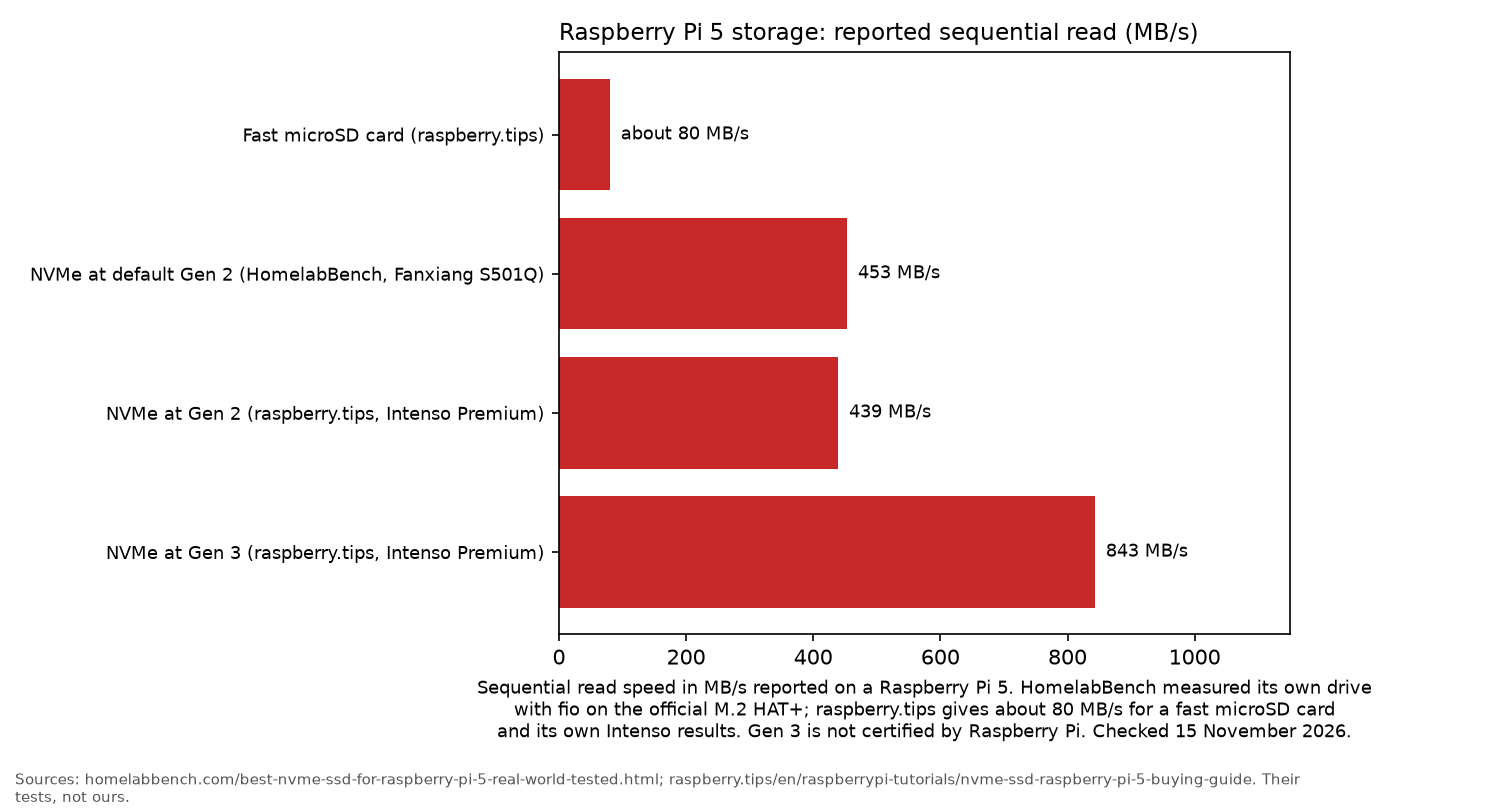
- Speed you will actually get. Raspberry Pi says the M.2 HAT+ uses the Pi's single-lane PCIe 2.0 interface, with a peak of 500 MB/s. At the default Gen 2 setting, HomelabBench recorded 453 MB/s reads and 438 MB/s writes.
- Power. According to Raspberry Pi, the HAT+ can supply up to 3A to the drive. raspberry.tips notes that Geekworm boards normally power the SSD through the ribbon cable, which has a 5W limit. Power-hungry PCIe 4.0 and 5.0 flagship drives can exceed that limit.
- Cooling. The standard HAT+ includes a 16mm stacking header, allowing it to sit above the Active Cooler. The Compact version has no such header.
- M-key NVMe only. M.2 SATA drives are not compatible with the Pi 5's PCIe port, according to raspberry.tips.
The picks
Raspberry Pi SSD Kit: easiest setup
The official Raspberry Pi SSD Kit includes the M.2 HAT+ and a Raspberry Pi 2230 SSD. Both parts are designed to go together, so there's no need to check which drive fits.
The Amazon UK listing specifies 50k IOPS for random reads and 90k IOPS for random writes on the 512GB model. The box also contains the 16mm stacking header, spacers and screws.
According to raspberry.tips, the official SSDs fit every board covered in its guide.
Who it's for: anyone moving a home server from microSD who wants a complete package without spending time researching parts.
Who it isn't for: anyone needing more than 512GB, or using the official Raspberry Pi 5 case, which requires the Compact HAT+.
Raspberry Pi M.2 HAT+ plus WD SN740 2230: build your own official setup
Buying the official M.2 HAT+ separately lets you choose your own 2230 SSD. The HAT+ listing confirms support for 2230 and 2242 drives, power delivery of up to 3A, and an included ribbon cable and header.
The WD SN740 2230 uses PCIe 4.0 but can fall back to slower connections. Pimoroni reports that its unit worked well, although it cautions that results may vary.
Who it's for: anyone who prefers the official adapter board but wants a branded 2230 SSD.
Who it isn't for: anyone who wants a drive with firm compatibility confirmation. The official SSD Kit is the safer choice.
There is no buying button for the WD SN740.
Raspberry Pi M.2 HAT+
Geekworm X1001 plus Silicon Power A60: best 2280 setup
The Geekworm X1001 mounts above the Pi 5 and supports SSDs from 2230 to 2280. Its listing quotes read speeds of up to 781 MB/s in PCIe 3.0 mode and 415 MB/s in PCIe 2.0 mode. It also warns against using drives with Phison controllers.
For a larger storage setup, raspberry.tips recommends pairing the X1001 with the 1TB Silicon Power A60. The A60 has no DRAM cache and uses little power.
Who it's for: media servers, Frigate recording and NAS projects that need 1TB of storage.
Who it isn't for: builds that need the GPIO header for another HAT.
Geekworm X1001 NVMe board for Raspberry Pi 5
Silicon Power A60 1TB NVMe SSD
Pimoroni NVMe Base: keeps the top free
The Pimoroni NVMe Base attaches underneath the Raspberry Pi 5 rather than sitting above it. It accepts 2230 to 2280 SSDs, leaving room on top for other HATs, coolers or displays (raspberry.tips).
Pimoroni also provides the longest compatibility list found for this guide. It includes drives such as the Crucial P3, Kioxia Exceria and Samsung 980.
Who it's for: projects that already need the GPIO header for something else.
Who it isn't for: anyone looking for the simplest installation. The official SSD Kit involves less effort.
Geekworm X1004: two drives
The Geekworm X1004 supports two 2280 NVMe drives. According to raspberry.tips, dual-drive boards use a switch chip to divide the Pi's single PCIe lane between both SSDs. That means they share the available bandwidth, and PCIe Gen 3 is unavailable.
The product listing confirms NVMe boot support with EEPROM firmware dated 17 May 2024 or later.
For an alternative that mounts underneath the Pi, there's the Pimoroni NVMe Base Duo.
Who it's for: a compact NAS using mirrored drives.
Who it isn't for: anyone prioritising maximum speed.
Setup box: boot from NVMe
- Update the bootloader using
sudo rpi-eeprom-updateso the firmware supports NVMe boot (HomelabBench). - Use Raspberry Pi Imager to flash your operating system to the NVMe drive, or clone your existing SD card.
- In
raspi-configor the EEPROM configuration, change the boot order so NVMe takes priority over SD. - Optional: add
dtparam=pciex1_gen=3to/boot/firmware/config.txt, then reboot to enable Gen 3. raspberry.tips warns that Raspberry Pi does not certify this mode and stability is not guaranteed. If the SSD starts misbehaving, remove the line.
sudo rpi-eeprom-update
sudo raspi-config
For more Linux hardware guides, visit the Linux hub, Raspberry Pi 5 kits for a home server and mini PCs for a home server. For setup and storage advice, see self-hosting: getting started and backups that restore.
FAQ
Can a Raspberry Pi 5 boot from NVMe?
Yes. The bootloader firmware needs to be up to date, with NVMe placed ahead of SD in the boot order.
Which SSD sizes fit the M.2 HAT+?
According to Raspberry Pi, the standard M.2 HAT+ supports 2230 and 2242 drives. The HAT+ Compact supports 2230 only.
Is PCIe Gen 3 safe on a Pi 5?
Raspberry Pi does not certify PCIe Gen 3 mode, and raspberry.tips warns that it can be unstable. Many drives work without problems, but if yours becomes unreliable, switch back to Gen 2.
Does the official SSD Kit include the HAT?
Yes. The Amazon UK listing confirms that the kit contains both the M.2 HAT+ and a Raspberry Pi NVMe SSD.
Which SSDs should I avoid on a Pi 5?
According to raspberry.tips and Geekworm, avoid SSDs with Phison controllers, drives using the Maxio MAP1202 controller, and M.2 SATA drives.
As an Amazon Associate I earn from qualifying purchases.