Best Zigbee Coordinator for Home Assistant (UK)
The best Zigbee coordinator for Home Assistant for most UK home servers is the official Home Assistant Connect ZBT-2. It has the newer Silicon Labs MG24 chip, a setup wizard built into Home Assistant and support for both ZHA and Zigbee2MQTT.
For a cheaper option, the Sonoff ZBDongle-E remains a solid budget choice. If your server is tucked away in a cupboard or rack, a network coordinator such as the SMLIGHT SLZB-06MG24U lets you position the radio closer to your Zigbee devices.
This guide draws on Home Assistant's Connect ZBT-2 page, Nabu Casa's ZBT-2 support article, the ZBT-2 launch post, the Zigbee2MQTT adapter list, OwnYourStack's 2026 coordinator guide and Amazon UK listings. Chip and radio figures are maker claims. We have not tested these coordinators ourselves.
Quick picks
- Best overall: Home Assistant Connect ZBT-2 (MG24, official support, Zigbee or Thread)
- Best budget USB stick: Sonoff ZBDongle-E (MG21, aluminium case)
- Best for a server in a cupboard: SMLIGHT SLZB-06MG24U (Ethernet with PoE, USB or Wi-Fi)
- Best Sonoff network option: Sonoff Dongle Max (Dongle-M, MG24, Ethernet, Wi-Fi or USB)
- Do not skip: a 1 metre USB 2.0 extension lead for any USB stick
We may earn a commission if you buy through links on this page. It never changes our verdicts. How we review.
Home Assistant Connect ZBT-2
Sonoff ZBDongle-E Zigbee USB Dongle Plus
Where does your server live?
The position of your Zigbee radio often matters more than the brand. Before choosing a coordinator, think about where your Home Assistant server sits and how far it is from your devices.
| Your host | Where it usually sits | Devices | Pick | Extras you need |
|---|---|---|---|---|
| Raspberry Pi 5 | Living room shelf, central | Up to about 50 | Connect ZBT-2 or ZBDongle-E | The ZBT-2 includes a 1.5 m USB cable. A stick needs a USB 2.0 extension, away from the Pi's USB ports |
| Mini PC | Office or under a desk | Any | Connect ZBT-2 | Included cable, or an extension if a stick would sit behind the case |
| NAS or VM | Cupboard, loft or rack | Any | SLZB-06MG24U or Sonoff Dongle Max | Ethernet run to a central spot; PoE switch or injector, or a USB power supply |
| Home Assistant Green or Yellow | Near the router | Up to about 50 | Connect ZBT-2 | The included 1.5 m USB cable |
| Two buildings or a big house | Main house | 100 plus | One coordinator plus mains-powered Zigbee routers | Plugs or bulbs that act as routers |
These device counts are rough planning guides, not hard limits. Mains-powered Zigbee devices help extend the mesh as more devices are added.
Spec table
| Coordinator | Chip | Connection | Thread too? | Notes |
|---|---|---|---|---|
| Home Assistant Connect ZBT-2 | Silicon Labs MG24 | USB-C | Yes, one protocol at a time | Official, open hardware, works with ZHA and Zigbee2MQTT |
| Sonoff ZBDongle-E | EFR32MG21 | USB | Not the focus | Ships with Zigbee coordinator firmware |
| SMLIGHT SLZB-06MG24U | EFR32MG24 | Ethernet (PoE), USB, Wi-Fi | Not the focus | Also works as a router or extender |
| SMLIGHT SLZB-06M | EFR32 | Ethernet (PoE), USB, Wi-Fi | Experimental Matter over Thread (Amazon UK listing) | Older chip than the MG24 version |
| Sonoff Dongle Max (Dongle-M) | EFR32MG24 + ESP32 | Ethernet (PoE), Wi-Fi, USB | Firmware switchable | Local web console |
Sources: maker pages and the Amazon UK listings checked on 16 November 2026.
What matters when you choose
Chip. Silicon Labs MG24 is the current chip. Home Assistant says the MG24 brings higher processing power and better sensitivity to weak signals than the MG21 used in the older ZBT-1. That doesn't make MG21 sticks obsolete. The ZBDongle-E still works well with ZHA and Zigbee2MQTT.
USB interference. Home Assistant says USB ports and nearby electronics can weaken a stick-style antenna, which is why it recommended an extension cable for the ZBT-1. A short USB 2.0 extension lead puts a stick away from the computer. The ZBT-2 includes a 1.5 m USB cable so the antenna can sit in the open.
Zigbee or Thread, not both at once. Nabu Casa says the ZBT-2 supports either Zigbee or Thread, and that running both at the same time on the same adapter is not supported. Home Assistant tested multiprotocol on the ZBT-1 and found it inconsistent. To run both protocols, you'll need two adapters.
Firmware path. The ZBT-2 receives updates through Home Assistant. SMLIGHT and Sonoff network coordinators can be updated through their own device web pages. That's particularly useful when the server is tucked away in a cupboard.
ZHA or Zigbee2MQTT. ZHA comes built into Home Assistant and is the easier place to start. Zigbee2MQTT needs an MQTT broker. Nabu Casa lists both for the ZBT-2, and the Amazon UK listings for the other four name Home Assistant and Zigbee2MQTT.
The picks
Home Assistant Connect ZBT-2
The ZBT-2 is the replacement for the ZBT-1, originally sold as SkyConnect. Home Assistant has ended production of the older model and says software support continues.
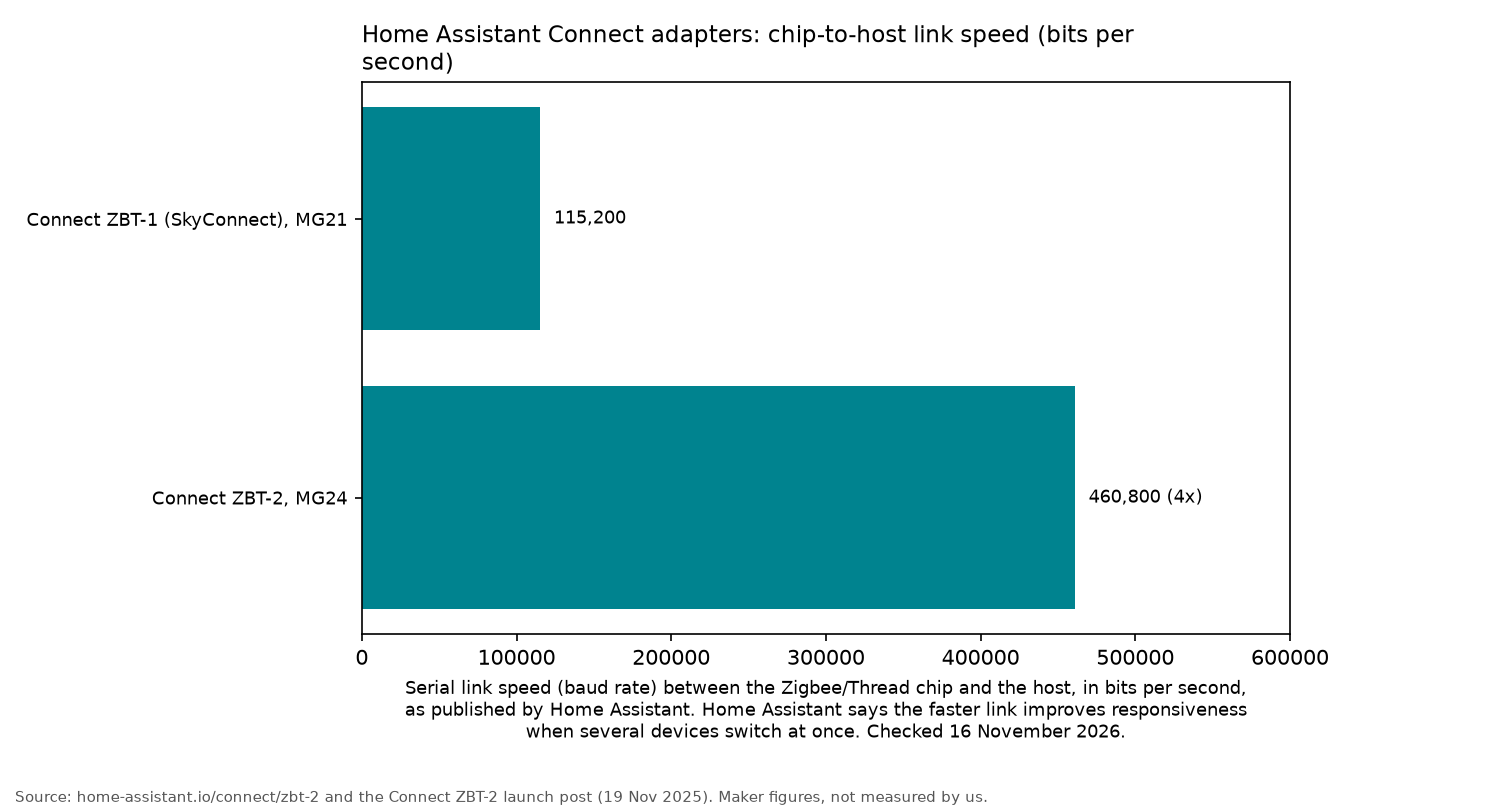
Home Assistant lists an MG24 radio and an ESP32-S3 USB bridge. The serial link speed goes from 115,200 to 460,800 bits per second. Home Assistant says the faster link improves responsiveness when several devices switch at once.
Home Assistant moved the ZBT-2 off the small stick shape to a free-standing antenna and base, and includes a 1.5 m USB cable.
Who it's for: Home Assistant users who want an officially supported setup with a guided wizard, or anyone upgrading from an older ZBT-1.
Who it isn't for: anyone needing Zigbee and Thread simultaneously from one adapter, or those keeping their server hidden in a cupboard.
Sonoff ZBDongle-E
The ZBDongle-E has been a popular budget coordinator for years. The Amazon UK listing says it uses an EFR32MG21 chip and has a +20dBm output gain.
The same listing says the aluminium housing reduces signal interference from nearby equipment, and that it ships with Zigbee coordinator firmware already installed, so it works with Home Assistant and Zigbee2MQTT straight out of the box.
Who it's for: Raspberry Pi and mini PC owners who want an affordable coordinator for a typical house of devices.
Who it isn't for: anyone looking for the newer MG24 chip or official Home Assistant support.
SMLIGHT SLZB-06MG24U
The SLZB-06MG24U is a network coordinator built around the EFR32MG24 chip. The Amazon UK listing says it supports Ethernet with PoE, USB and Wi-Fi, so the radio does not have to sit next to the server.
The Amazon UK listing specifies a +20dB amplifier and a +5dB antenna. Position the coordinator on your network in a central hallway, and the Home Assistant server can stay wherever it suits you.
Who it's for: NAS, VM and rack installations, particularly those with a PoE switch.
Who it isn't for: a simple Raspberry Pi setup on a shelf, where a USB stick means less to manage.
Sometimes sold via Amazon Global Store; check import charges at checkout.
The older SLZB-06M is still available. It offers the same three connection modes. The Amazon UK listing describes an EFR32 chip, older than the MG24 version, and experimental Matter over Thread. The MG24 version is the better choice unless you only need a second coordinator for another building.
Sometimes sold via Amazon Global Store; check import charges at checkout.
Sonoff Dongle Max (Dongle-M)
The Dongle Max is Sonoff's network coordinator option. The Amazon UK listing says it combines an EFR32MG24 radio with an ESP32 and supports Ethernet, Wi-Fi and USB connections.
The same listing describes a local web console for settings and firmware switching, so there's no need to open the case to change firmware.
Who it's for: anyone who prefers Sonoff equipment and wants a network coordinator with browser-based settings.
Who it isn't for: someone who simply wants to plug a USB stick into a Raspberry Pi.
A USB 2.0 extension lead
A basic 1 metre USB 2.0 extension lead is worth adding to a USB stick coordinator. It moves the dongle away from the computer and makes it easier to position upright in the open. The Amazon UK listing for this cable is a 1 m USB 2.0 A-male to A-female lead.
Sometimes sold via Amazon Global Store; check import charges at checkout.
Setup tips
- Position the coordinator upright, away from metal, SSD enclosures and the router. Use the ZBT-2's included cable, or an extension lead for a USB stick.
- Choose a Zigbee channel that avoids your Wi-Fi. As general planning guidance, Zigbee channels 15, 20 and 25 sit between the commonly used Wi-Fi channels 1, 6 and 11.
- Pair mains-powered Zigbee devices first, close to the coordinator. This establishes the mesh routers before you start adding battery-powered sensors.
- Back up the coordinator before changing hardware. Both ZHA and Zigbee2MQTT support network migration, while Home Assistant backups preserve the settings. See backups that restore.
If you're still building your server, start with the Raspberry Pi 5 home server kit, the mini PC for a home server guide or self-hosting: getting started. For quicker Raspberry Pi storage, there's also the NVMe SSD for Raspberry Pi 5 guide.
FAQ
Which Zigbee dongle is best for Home Assistant?
The Home Assistant Connect ZBT-2 is the best choice for most people. It is the official adapter and uses the newer MG24 chip. For a cheaper alternative, the Sonoff ZBDongle-E is a good option.
Is the ZBT-2 better than the SkyConnect or ZBT-1?
Home Assistant says yes. It has a better antenna, the newer MG24 chip and a serial link that is four times faster. Production of the ZBT-1 has ended, and Home Assistant says software support continues. There is no need to rush out and replace one that is working well.
Can one stick do Zigbee and Thread?
Not on the same ZBT-2. Nabu Casa says running Zigbee and Thread at the same time on the same adapter is not supported. Home Assistant recommends a separate adapter for each protocol.
Do I need a USB extension lead?
Yes, for a USB stick. Home Assistant recommended an extension for the stick-style ZBT-1. The ZBT-2 includes a 1.5 m USB cable.
Zigbee2MQTT or ZHA?
ZHA comes built into Home Assistant and is the easier place to start. Zigbee2MQTT is the other option Nabu Casa lists for the ZBT-2, and it needs an MQTT broker.
As an Amazon Associate I earn from qualifying purchases.